Placing every post on the scheduler by hand works fine at five posts a week. At twenty-five, across a handful of channels, it becomes the least valuable half hour of your day. The batch of updates from May and June is mostly aimed at that kind of work: the repetitive placement, duplication, and sharing steps between "content is ready" and "content is out."
Source: Product changelog, weeks of May 11 through June 28, 2026.
Auto-schedule posts with channel time slots
You can now create time slots for each channel, and posts get placed on the post scheduler automatically instead of one drag at a time. Slots can be unconditional (anything ready goes into the next open slot) or conditional, so a slot only accepts posts that match.
[Screenshot: channel time slots with a condition attached]
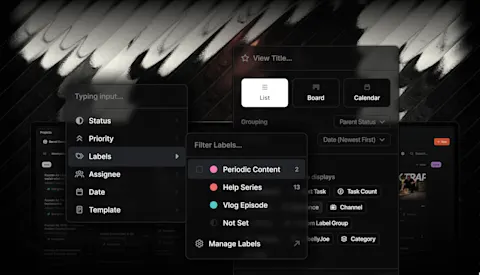
Custom labels are the other half of this. You can create your own labels for projects and posts, and they show up in the post scheduler and post manager. In the auto scheduler, labels work as conditions with includes and excludes operators, so a "client-a" slot takes only that client's posts and a "longform" slot can exclude everything else. Labels also carry over when you duplicate a post, and they now show on unscheduled posts so you can see what's waiting.
Share links grew up
Share links picked up four upgrades that make external review less fiddly:
Share a whole project in one click. From the Kanban, you can now generate a link to an entire project instead of sharing items one by one. If a link already exists, you can toggle "share all" on or off after creation.
Send the link from Clipflow. You can email a share link to recipients straight from the share link edit page, rather than copying it into a separate email.
Pages are reviewable. With "share all" enabled, people opening a project share link can now review pages, not just media.
Duplicate projects
Recurring formats no longer start from scratch. Duplicating a project from the projects board or project overview keeps the status, channels, task list, custom labels, and posts, and the copy links back to the original as a parent project, so a weekly show or monthly client package becomes a two-click setup.
Kanban multi-select
You can now select several projects or ideas on the Kanban board (Cmd or Ctrl and click) and drag them together, including items from different columns into one status. Cmd/Ctrl-clicking a title opens it in a new tab.
Comments and the editor
A few changes for the review conversation itself: comment authors can edit their own conversation comments, with an "(edited)" label showing next to the timestamp. Media review comments can be sorted by video timestamp instead of date created, which reads much better for a long review pass. And team members can opt in, per organization, to get an email when any comment is added, even on projects they aren't assigned to.
Rich Text Pages also gained tables: insert from the slash menu, paste from Markdown, resize columns, and add rows or columns inline.
Smaller changes worth knowing about
- Duplicate As bulk-duplicates a post and assigns multiple channels or products in one step
- Creating a post from a media file copies the transcript into the caption, ready to edit
- Sub-projects inherit the parent project's labels and assigned users, and the new-project modal hides the fields they inherit
- The Media List has a filter for approved files that haven't been used in a post yet
- Pending client invites show on the clients screen with resend and cancel actions
- After a trial expires, admins can still open the team page from billing and adjust the roster before subscribing
- Synced posts use the caption as the title when no title is set, instead of a generic product name
- Pasted rich text drops inline colors, so scripts stay readable in dark mode
What's next
The other big story from this stretch is publishing: Instagram, TikTok, and YouTube posting from Clipflow are all live now, covered in their own post. Between auto-scheduling on one end and direct publishing on the other, the manual steps in the middle of your content week keep getting fewer.