Content Operations for Podcast Teams
Podcasting went video-first. Your ops should too.
Every episode now carries an edit, a stack of clips, a thumbnail, show notes and three platforms of publishing. Clipflow is the workspace where you, your editor and your producer run that pipeline together, from recorded to live.







Join 4,000+ Businesses Today
High-output content teams trust Clipflow







Who is it for
For shows that ship every week, with a team behind them.
Somewhere between episode one and episode fifty, the show stopped being a side project. You brought in an editor, maybe a producer or a VA, and the coordination moved into group chats and spreadsheets nobody fully trusts.
Built for podcast teams where
You host, someone else edits
Full episodes go to YouTube and Spotify, clips go everywhere else
Guest prep, cut reviews and clip approvals live in five different tools
The show is part of your business, so missing a week actually costs you
You're the bottleneck between recording and publishing
Probably not for you yet, if...
You're audio-only and plan to stay that way
You record, edit and publish it all yourself
You publish when you feel like it, and that's fine
You're looking for a tool that records or edits for you
You haven't recorded episode one yet
Inside the podcast team workspace
Every episode, every platform, one workspace
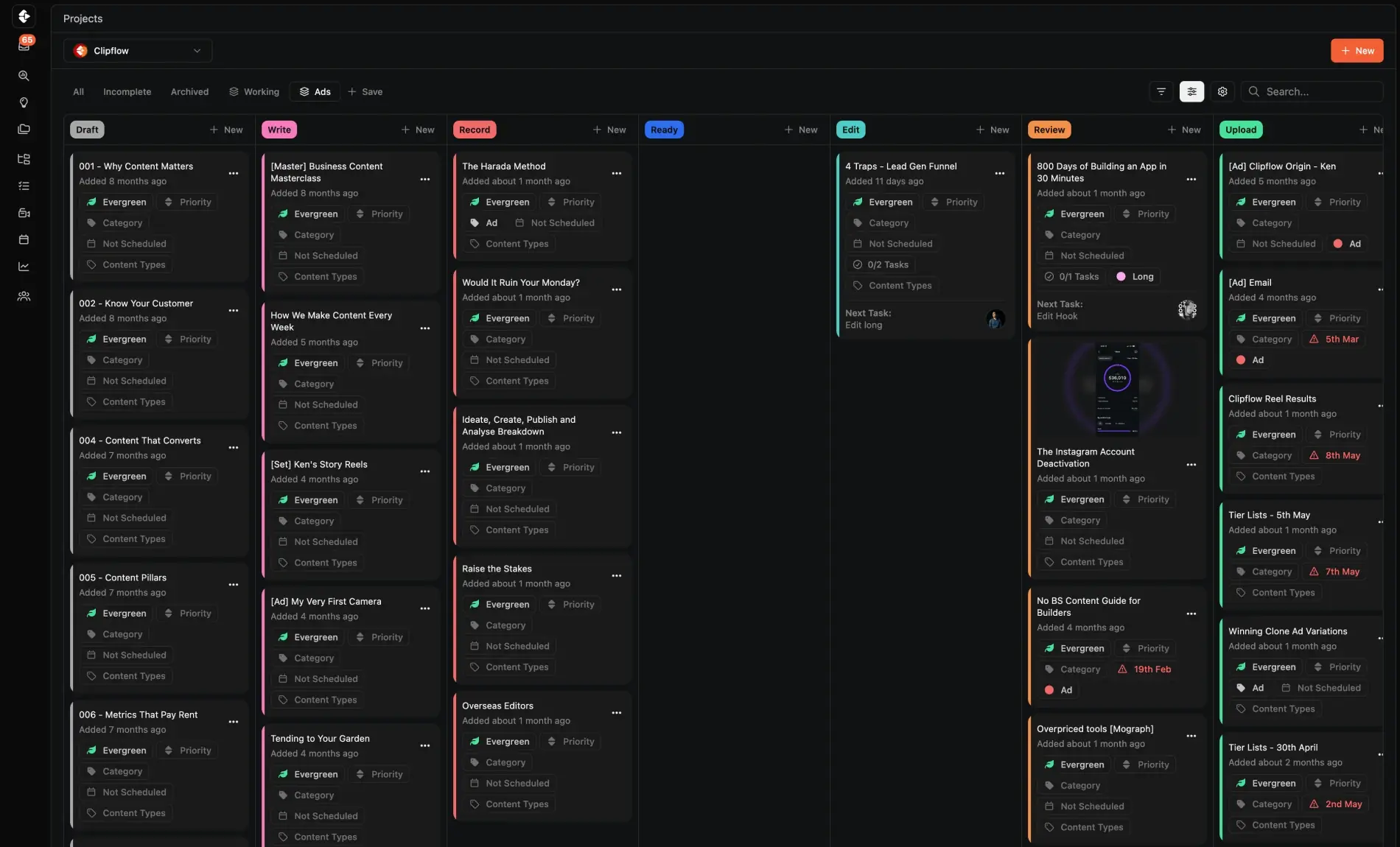
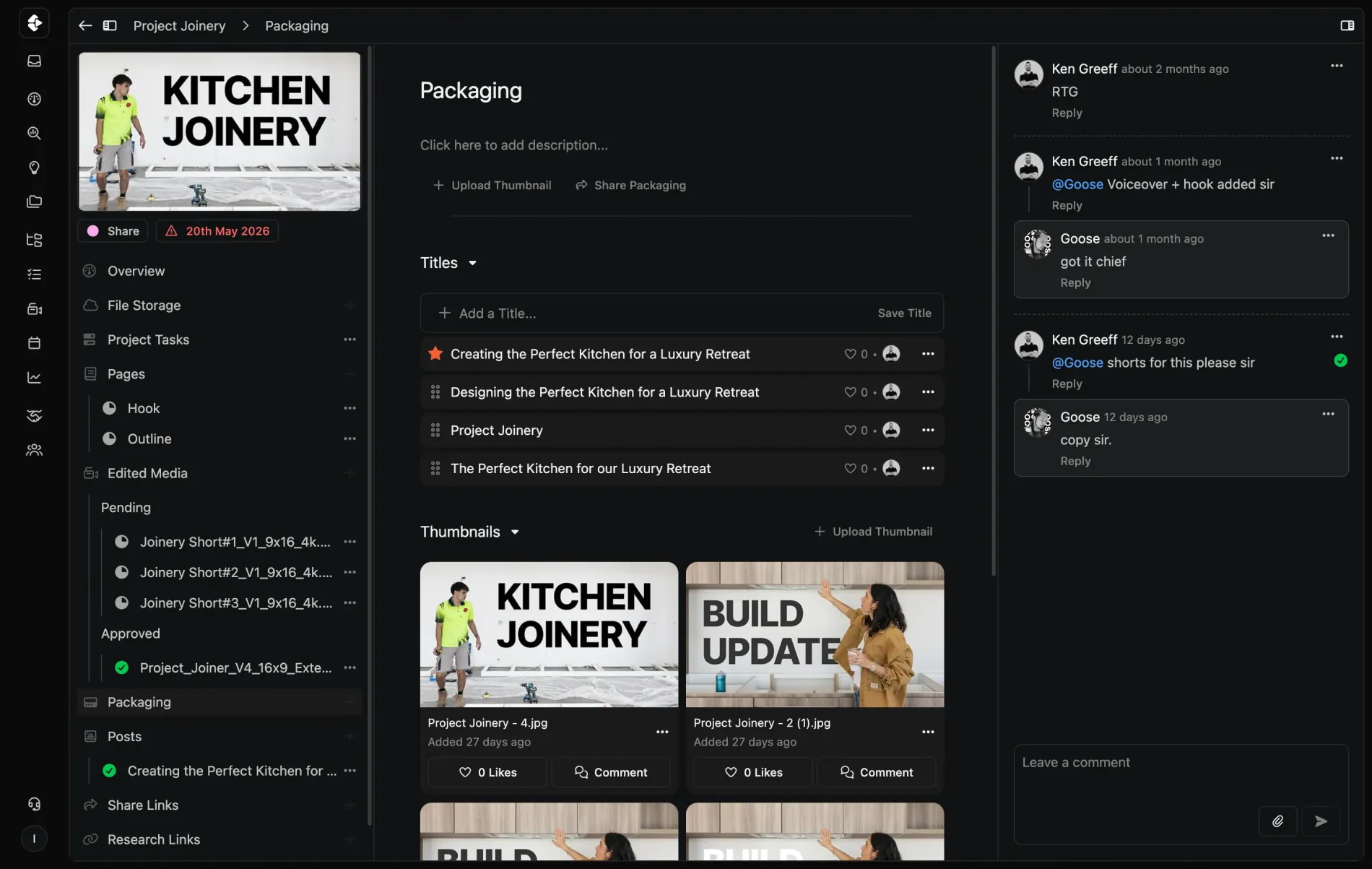
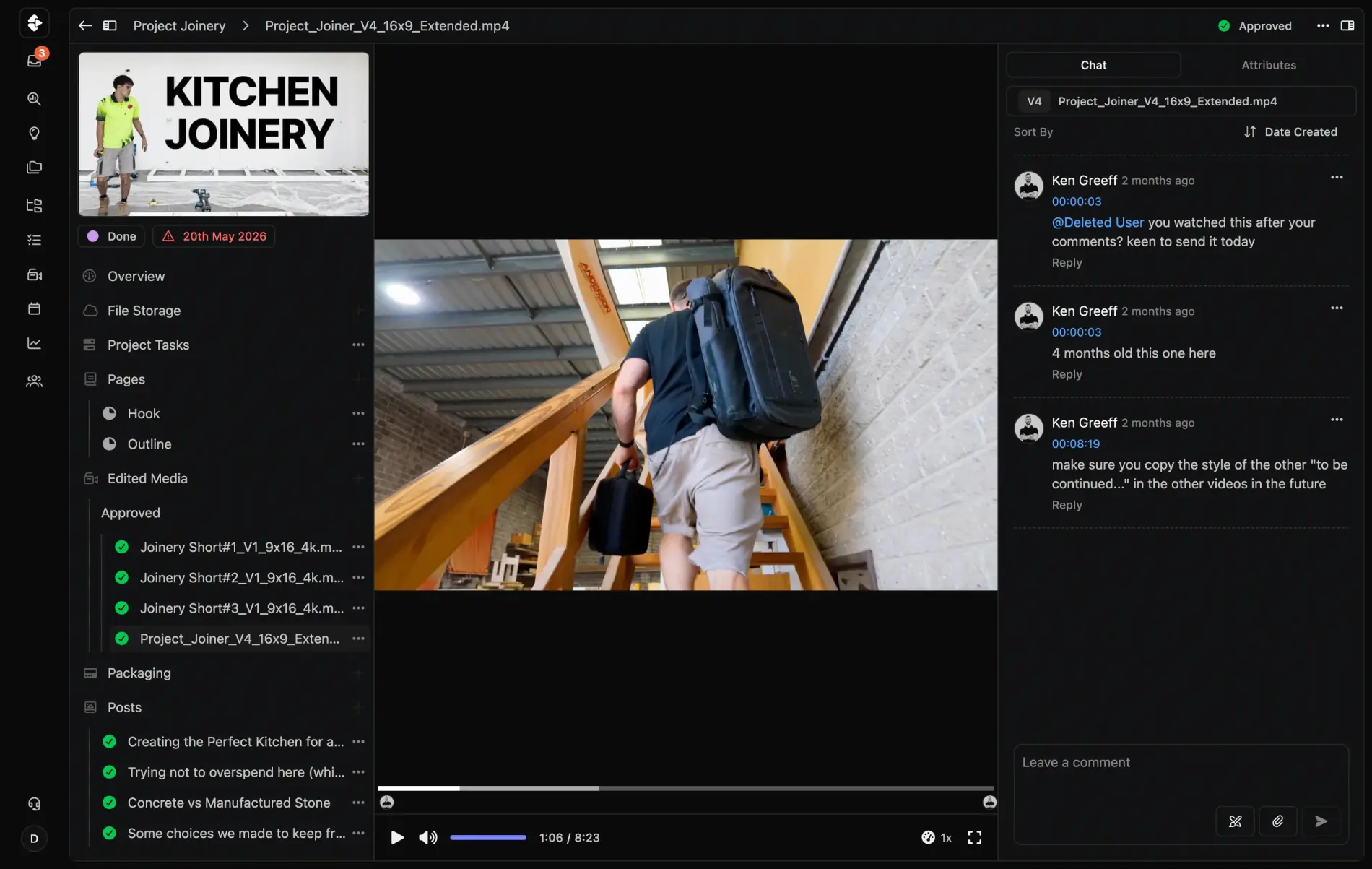
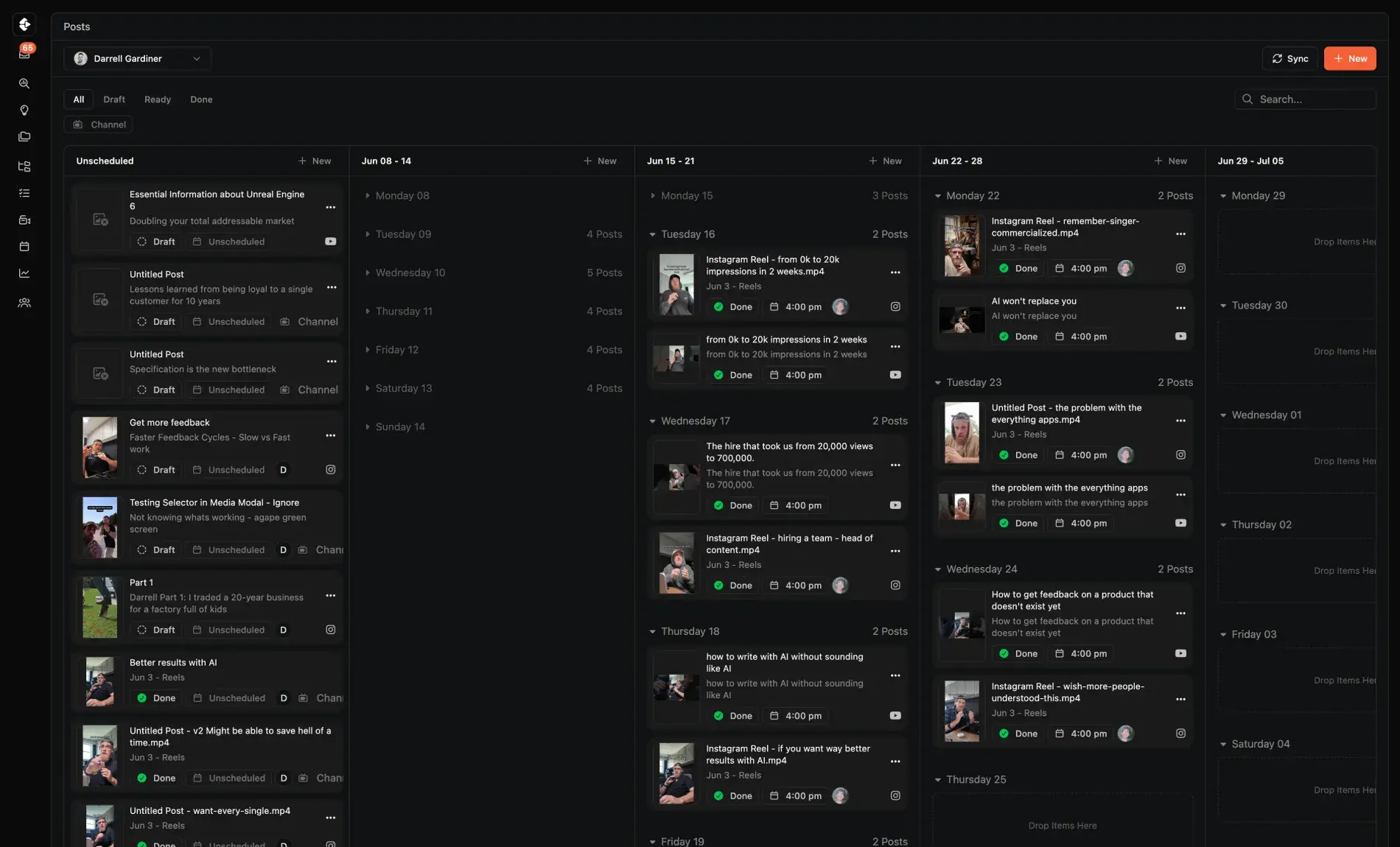
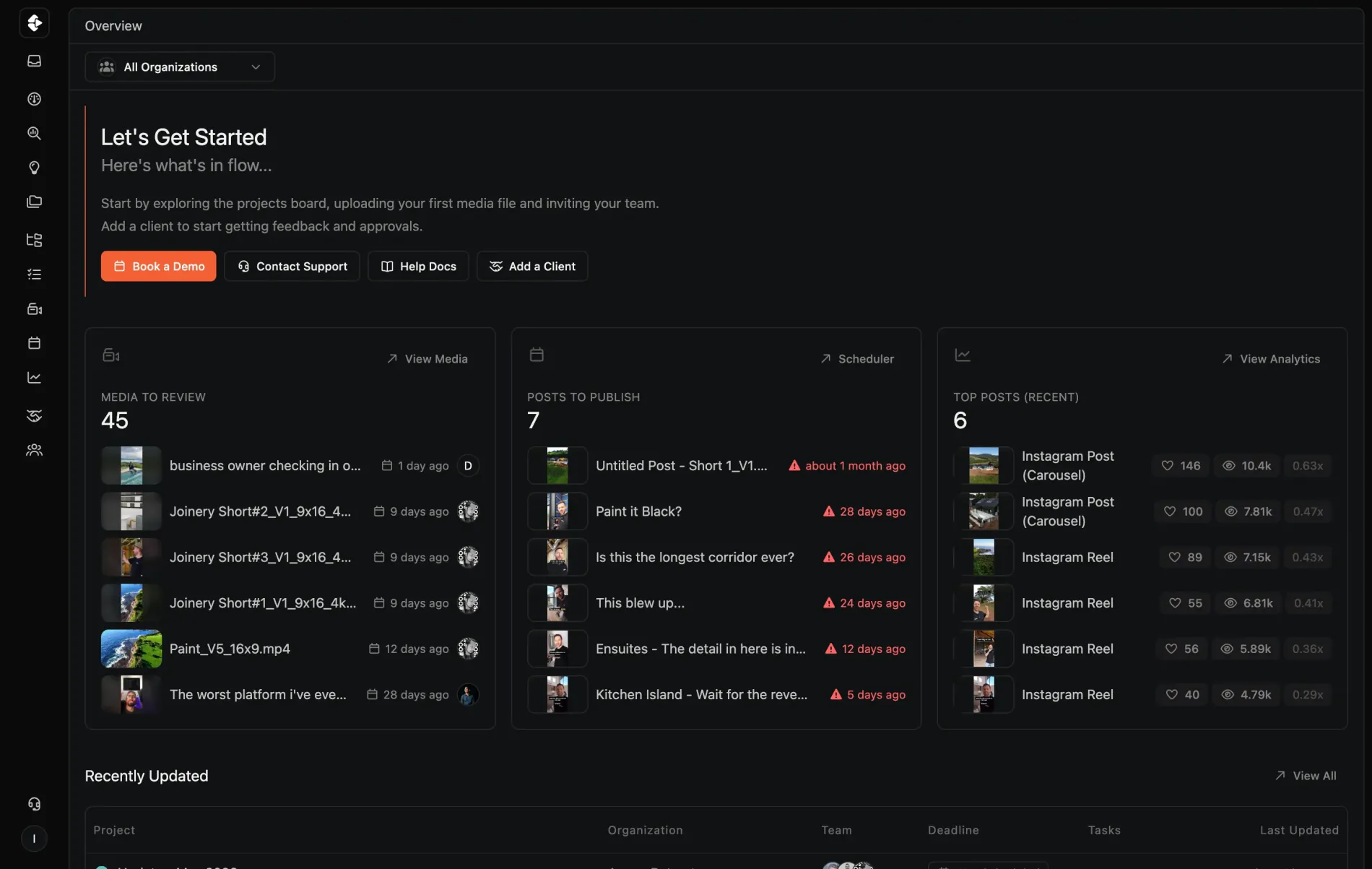
From the episode board to the cut review to the clips going out, your host, editor and producer run the show in one place.

The time it's saved me is absolutely crazy. It is honestly one of the best things I have invested time in this year.
Hannah Martin
@hannahmartinRG
The per-episode sprawl
One recording turns into fifteen deliverables. The tools never kept up.
Recording got easy. Riverside handles the call, your editor handles the cut. Everything between and after still runs on spreadsheets, Drive folders and a group chat called "Podcast".
Guest prep and pre-production
Research in one doc, questions in another, the recording link in an email thread. Your co-host and producer are never looking at the same plan.
The review loop with your editor
The cut lands in Drive, notes go back as voice memos and screenshots, and nobody is sure which version is current. Every episode ships a revision later than it should.
Clips, captions and thumbnails
Five to eight clips per episode, each with its own caption and crop. Which ones got approved? Which ones went out? Someone scrolls the chat to find out.
Publishing across platforms
The full episode goes to YouTube and Spotify, the clips go to Shorts, Reels and TikTok. Tracking what shipped where lives in one person's head.

It's probably 80% admin, and Clipflow just lets you go, 'you know what, let's drop that down to about 20 to 30%.'
Oscar Mitchell
True Cut Media

Run every episode in one place.
Everything between the recording and the publish, in the workspace your team already shares.
Episode Templates
Every episode runs the same pipeline: booked, recorded, edited, reviewed, approved, live. Set it up once and the next fifty episodes follow it.
Time-Stamped Review
Leave notes on the exact second of the cut. Your editor works from the same project with all the context, no exports, no screenshots.
Version Control
Every revision of the episode and every clip cut from it live together. No v3_FINAL guessing, no overwritten files.
An Asset Library That Compounds
Raw recordings, b-roll, brand assets and evergreen clips stay searchable across episodes instead of dying in a Drive folder.
Guest Sharing
Send a guest their episode for sign-off, or their clips to repost, with a link. No account, no login.
Publish From the Project
Schedule the episode and its clips to every channel from the same place they were approved.








Pick the publish date, every deadline sets itself.
Every episode runs from a template where each task carries a relative due date: the trailer five days before publish, the announcement post two days out, the edit the week before. Pick the publish date and the whole production run lands on the calendar.
When recording slips, move the date and every deadline shifts with it. Next week's episode starts from the same template, so the launch rhythm repeats without anyone rebuilding the schedule.
Episode templates
Relative due dates
Repeatable schedule
How podcast teams use Clipflow
From booked guest to published everywhere. One pipeline.
The same workflow runs every episode, so the team knows what's next without asking you.
- 1
Plan and book
Episode brief, guest research, questions and the recording date live in one project. Your co-host and producer prep from the same page.
- 2
Record and hand off
The recording lands in the project next to the brief. Your editor picks up the task with the full context, not a bare Drive link.
- 3
Review and approve
Time-stamped notes on the cut, clip selects and thumbnail choices in the same thread. One review loop instead of four scattered ones.
- 4
Publish and repeat
Episode, clips and captions scheduled across every channel. The next episode starts from the template, not from a blank page.
What changes for the show
The show ships weekly.
You stop chasing it.
When the pipeline is purpose-built, consistency stops depending on your memory and your evenings.
Episodes ship without you chasing them
Your editor and producer see what's next and where everything is. You show up to record and to approve, and the rest keeps moving.
Clips actually go out
The episode stops ending at the upload. Cutdowns are tasks with owners and deadlines, not intentions in a group chat.
Guests get a professional experience
Prep docs before the call, a sign-off link after, and ready-to-repost clips when it goes live. Guests share episodes that made them look good.
A second show doesn't double the chaos
Same templates, same pipeline, more output. Adding a channel, a series or a client show reuses the process instead of reinventing it.
Keep the tools that earn their place
Riverside records. Your editor edits. Clipflow runs everything between.
Keep your recorder and your edit suite. The coordination tools duct-taped around them are the ones you can cancel.
Before
After
Cut review with your editor
A review tool with per-seat fees. Frame.io, Loom links
Raw recordings and assets
A drive nobody can find anything in. Google Drive, Dropbox
Clip approvals and captions
A group chat scroll. WhatsApp, Slack, DMs
Publishing and scheduling
Manual uploads, tab by tab. Buffer, Later, native uploads
Guest prep and comms
Email chains and calendar ping-pong. Gmail, Docs, DMs
From episode chaos to publishing rhythm
The production grind kills more shows than a lack of ideas ever did.
Most podcasts quit somewhere between episode 7 and 25, worn down by everything that happens after the recording stops. A pipeline the team can run without you is what carries a show past that.
Today
Move your next episode in
Spin up an episode project from a template in two minutes
Guest research, questions and the recording date live together
Editor uploads the first cut and gets time-stamped notes inline
Raw recording sits next to the brief instead of a loose Drive link
Day 14
The review loop tightens
Your editor pulls the next task instead of pinging you
Clips get approved on the project the same day as the cut
Guests sign off through a share link, no account needed
You stop being the router between editor, producer and socials
Day 30
The show finds its rhythm
Every episode runs through the same pipeline
A clip backlog keeps the feed alive between episodes
Publishing survives your busiest week without slipping
Adding a second show or channel reuses the process you already built
Questions podcast teams ask...
If you've got further questions you can reach us via email or in-app once you start your trial.
Does Clipflow record or edit my podcast?
Does it replace my podcast host, like Buzzsprout or Transistor?
My editor is a freelancer. Do they need a paid seat?
How do video podcast teams keep up with clips?
Can guests review or share their episode before it goes live?
What platforms does Clipflow schedule to?
We produce podcasts for clients. Does this work for an agency?
How long does it take to move our show in?
TLDR; You've scrolled this far
Your show grew into a production, and the production is what's wearing you down. The recording is the easy hour of the week. Everything after it is why episodes slip.
If the next episode should ship on time without you chasing three people across four apps, the pipeline needs one home. Your team runs the episodes, you stay on the mic and the business.
P.S. If you're not sure it's right for your show, book a call with us after sign up and we'll help you figure it out. No hard sales pitch.
Ready for a consistent show?
Try Clipflow today. 14 days, free.
Bring your editor in. Run your next episode through Clipflow before your next recording day.